X Cleanup Console
Bulk-delete your posts on X faster with preview mode, smart controls, and optional Pro filters. Personally built by Daniel Moravec — founder of Best Odds Corp — for anyone who needs to clean up their X account without the manual grind.
Tools like this are available privately — some free, some through subscription. This is the public version. Work with Daniel for private access to the full toolkit.
Chrome extension required. Works on X.com in any Chromium-based browser.
Extension UI Preview
See it in action — operator-led bulk cleanup for X.
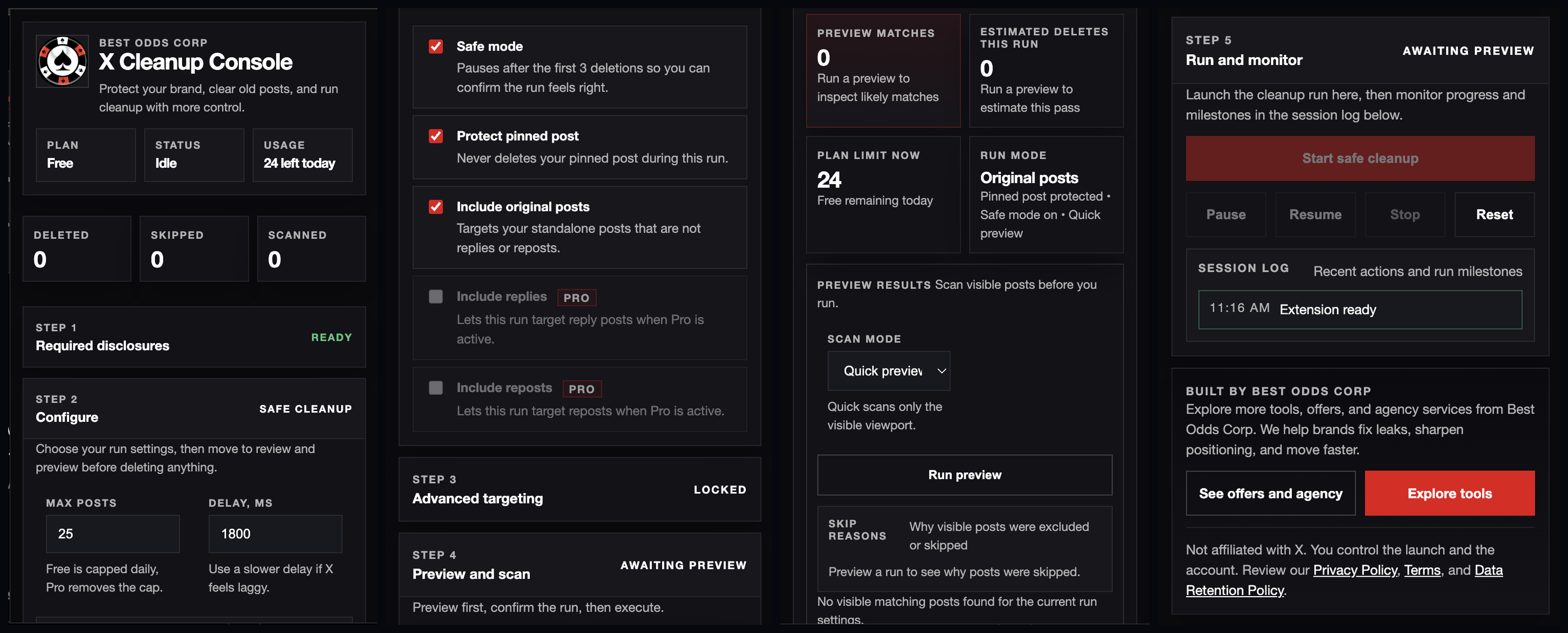
The X Cleanup Console extension panel loads alongside your X profile — giving you full control before any deletion begins.
About This Tool
Clean up your X account on your terms.
X Cleanup Console is a Chrome extension personally built by Daniel Moravec — founder of Best Odds Corp — to solve a real problem he encountered as an operator and content creator on X. Whether you're doing a full account reset, cleaning up old content before a rebrand, or just removing posts that no longer represent you — this tool gives you the controls to do it faster.
The free tier includes preview mode so you can see exactly what you're deleting before you start, bulk deletion from your visible timeline, a skip-pinned-post option, delay controls to pace the process, and up to 25 deletes per day.
The optional Pro upgrade adds advanced filtering — delete by keyword, date range, reply type, and repost type — along with higher-volume cleanup for accounts with large post histories.
This is one of several tools Daniel has built privately. Tools like this are available through Best Odds Corp — some free, some through subscription — as part of a broader toolkit for operators who want real leverage, not generic SaaS.
Built By
Daniel Moravec — Founder, Best Odds Corp
Daniel built this extension himself — not outsourced, not a white-label product. It's a direct expression of how he works: identify a real problem, build the tool, ship it.
He's an active content creator with 135,658+ followers on Afterhour and 17,186+ on X — so he built this tool from firsthand experience managing a real X presence at scale.
Distribution
135,658+
Afterhour Followers
17,186+
X Followers
Private Tools Access
Tools like this are available privately through Best Odds Corp — some free, some through subscription. This is the public version.
Built With
Chrome Extension API · Local browser automation · No server-side data collection
Features
Free tier. Pro upgrade. Your choice.
Free Tier
- Preview visible posts
- Bulk delete from visible timeline
- Skip pinned post
- Delay controls
- 25 deletes per day
No license required. Install and start immediately.
Pro Upgrade
- Keyword include filter
- Keyword exclude filter
- Delete before date
- Delete after date
- Include or exclude replies
- Include or exclude reposts
- Higher-volume cleanup
- License activation
Pro pricing available after installation. License activation included.
How It Works
Three steps to a cleaner account.
01
Install the Extension
Download X Cleanup Console from the Chrome Web Store and install it in any Chromium-based browser.
02
Open X and Preview
Navigate to your X profile. The extension loads alongside your timeline so you can preview posts before deleting.
03
Set Controls and Run
Configure delay settings, skip your pinned post if needed, and start the bulk delete. You stay in control the entire time.
Important Disclosures
Before you use this tool
- Deletes posts from the user's own X account
- Deleted posts cannot be recovered
- User must manually start the process
- Not affiliated with or endorsed by X
- Chrome extension required
Tags
Ready to clean up?
Download X Cleanup Console — Free
Install the Chrome extension, preview your posts, and start deleting. Free tier gets you started immediately. Upgrade to Pro when you need more control.
Chrome extension store link coming soon. Check back for updates.